Subscribe to feed

Updates

You are currently browsing the archive for the Updates category.

SpamDrain 2.0 for iOS released in App Store

Last week we finally released the new iOS app, SpamDrain 2.0, with support for both iPhone and iPad. A big hand to all beta testers that made the release possible. The past six months we have been working hard to finalize what is a complete rewrite of the old app. We have tried to gather all the feedback we have received from our lovely users and transform that into new features and improvements which hopefully makes the app more useful and usable. I know already that many of you love the improvements, but we also know that some of you don’t. That’s why it’s important that you keep sending us valuable feedback so we can keep up the work of improving the app even more.

Ok, enough with the words, give me some screenshots.

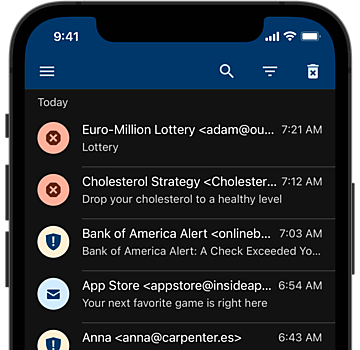
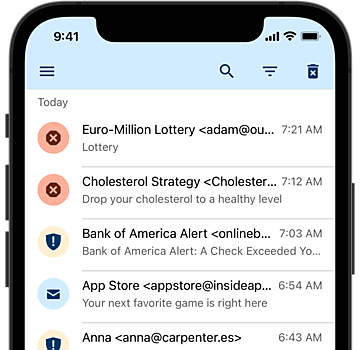
New message lists with search capability

New message lists with search capability and filtering on classification Spam?, Spam, Virus, Newsletter etc. This makes it easier to find messages you are looking for.

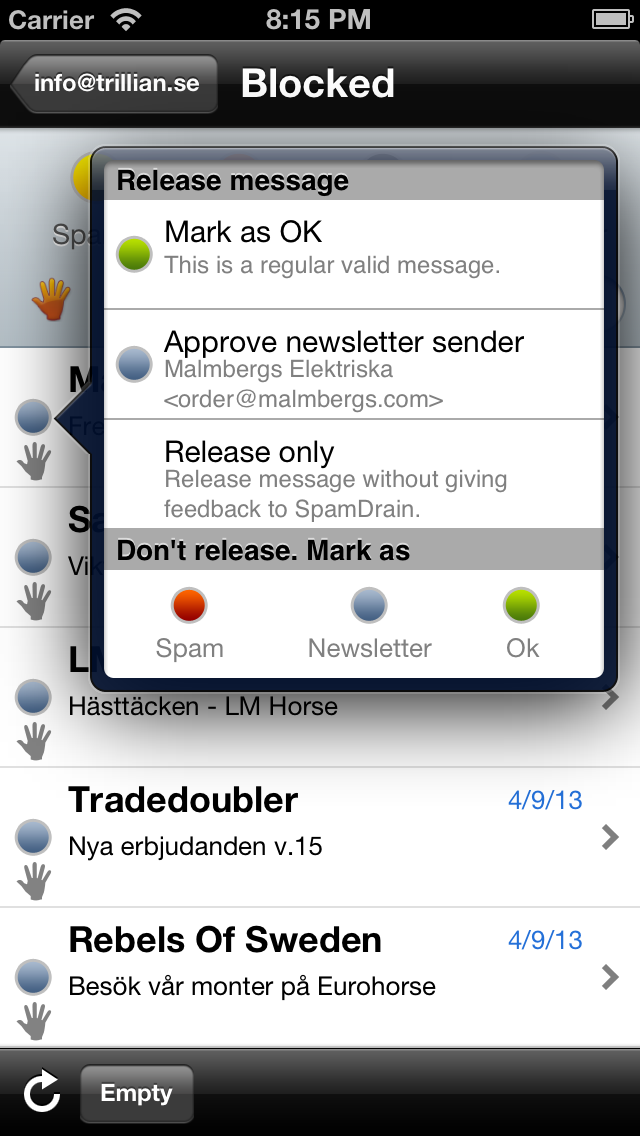
Report and release directly from the message lists

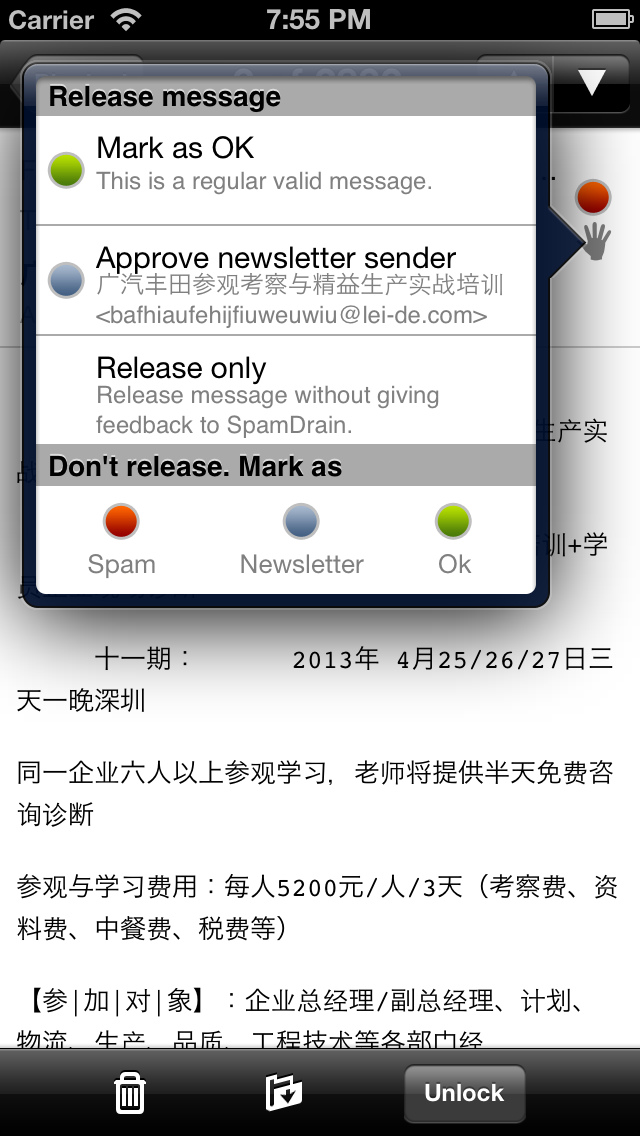
Report and release directly from the message lists. Also more options that will give more feedback to the filter.

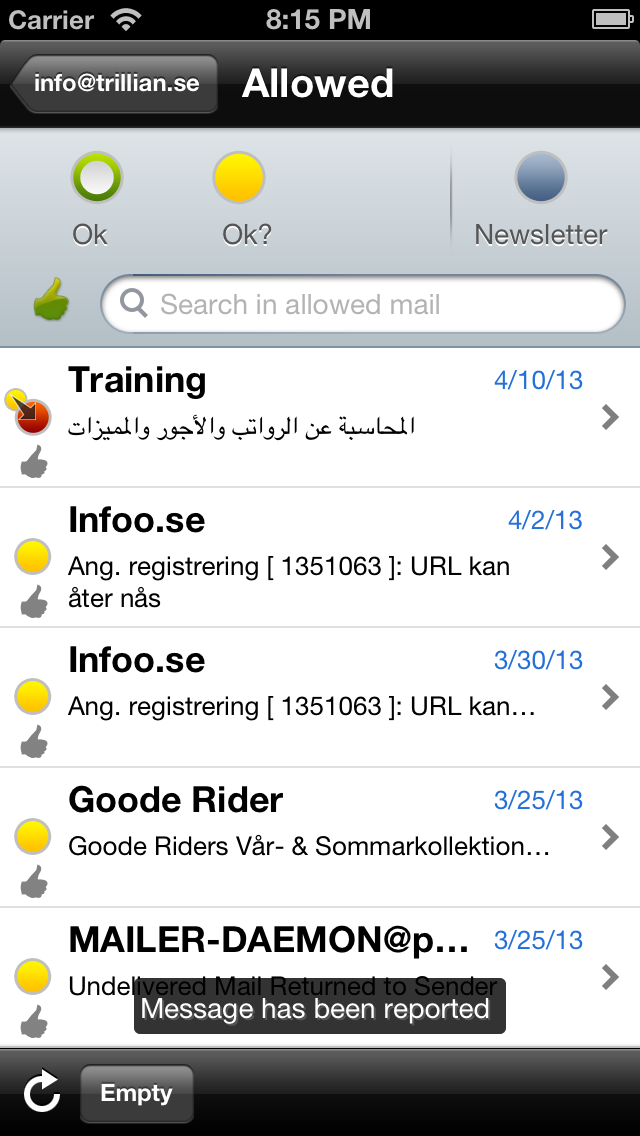
Clear indication of what has happened to a message

Clear indication of what has happened to a message. You now see directly in the list if you have reported or released a message and to which color you have changed it.

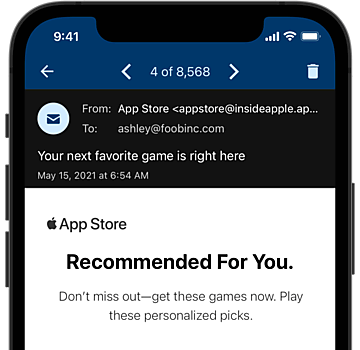
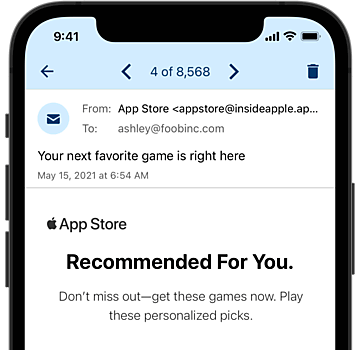
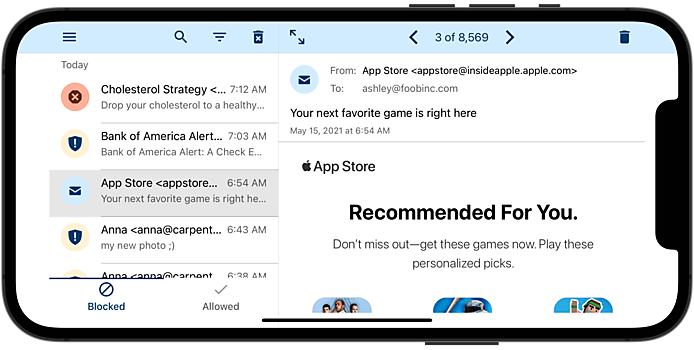
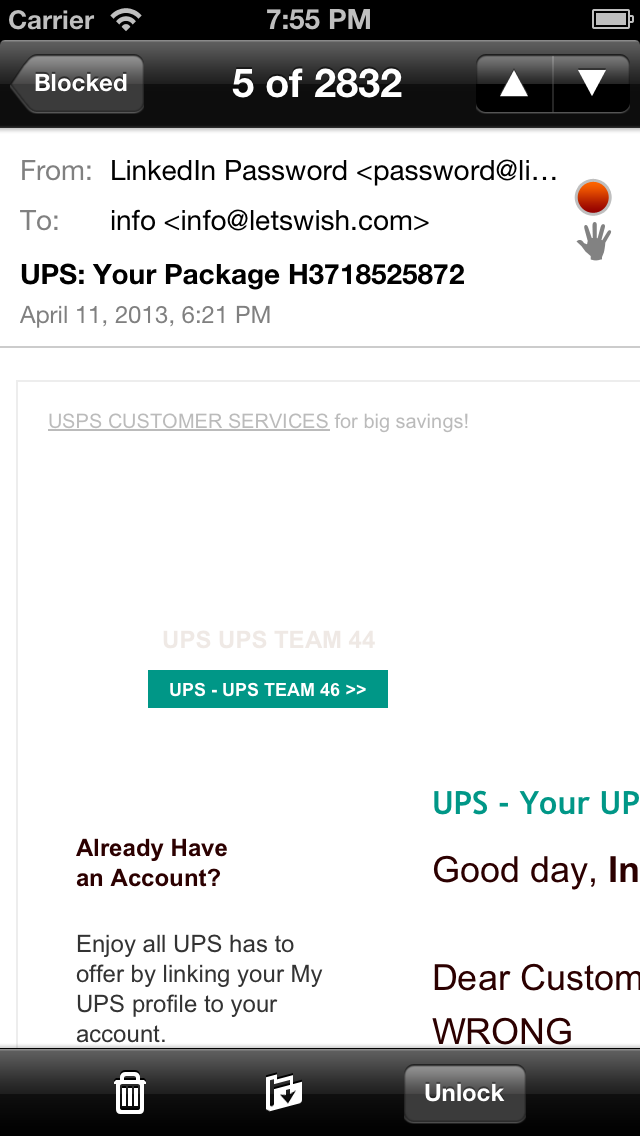
New email viewer with zoom functionality

New email viewer with zoom functionality. Ok, it may be a standard feature, but we are very proud of the new email viewer which is more like the native email viewer in your iPhone. You can zoom and scroll and unlock images and links. As before you may also report or release the message directly from the email viewer.

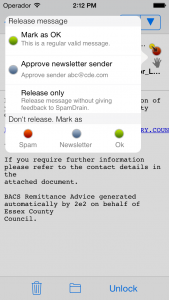
Report and release when viewing a message

Report and release when viewing a message. Hopefully it’s also a bit clearer what happens when you give feedback to SpamDrain.

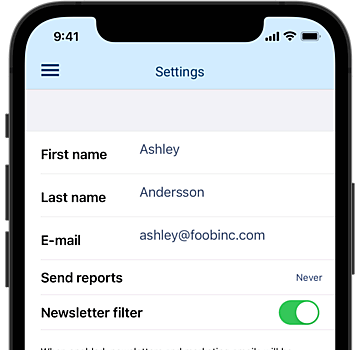
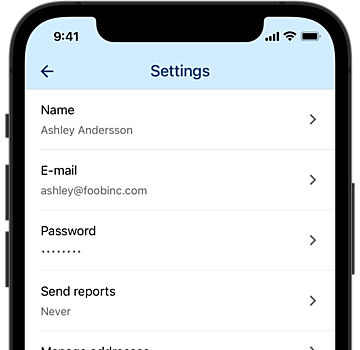
Update report settings for the app

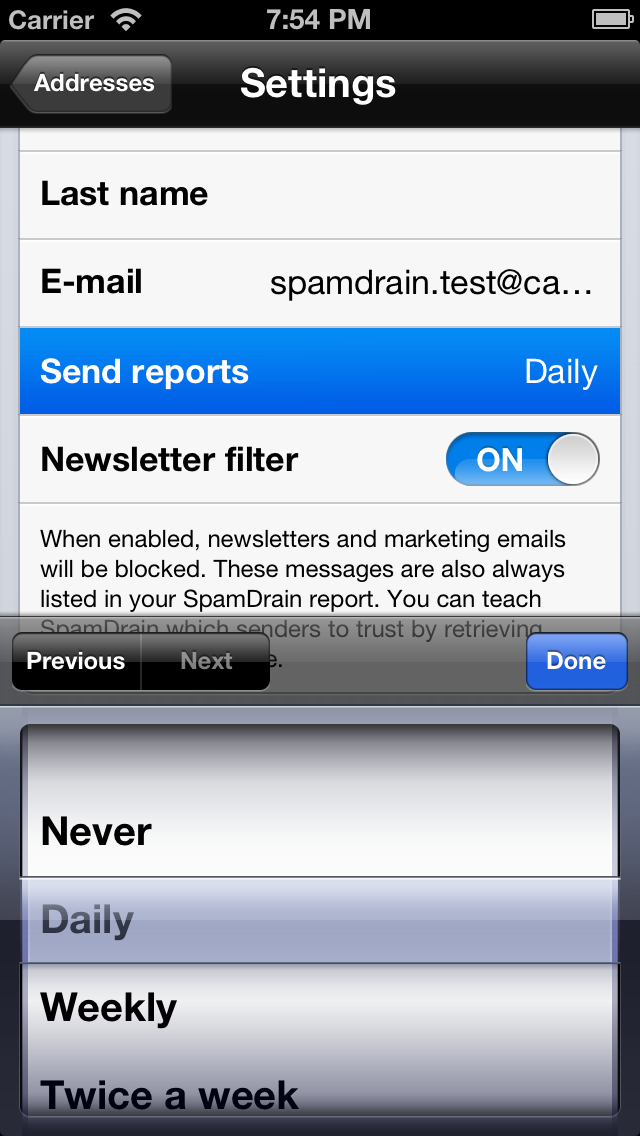
Update report settings for the app. Control how often you want the SpamDrain reports sent to you. We have also made it possible to update your name, company name etc.

Android app
We are also working on a similar rewrite of our Android app but we have not set the release date yet. We will however, release a minor update to our Android app next week or so that will rename the Archive and Report to Blocked and Allowed. We will also make similar updates to our web UI, so the experience is consistent on all devices. But until then, there will be a mix of terminology.

Please note
Unfortunately there is currently a known issue in the iOS app. If your iOS device is set to use 12-hour time, the app crashes when you sign in. We have already submitted a fix to Apple for review, but it may take another week before the new version is approved.

Until then, please make sure to set the 24-hour setting to “On” to use the SpamDrain app. You do this in your iPhone/iPad settings->General->Date&Time.

Final call for more iOS beta testers

Last week we released what we hope to be the final beta of the SpamDrain iOS app. Now we would like more users testing the beta before we push it to App Store. So…last chance folks before we make the final adjustments :-) .

Please click the button below to join the beta program – and remember to add your device in TestFlight – otherwise we won’t be able to send you any beta builds.

Join the beta program

TestFlight_Color_Full_LightBG_CMYK We use Testflight for this beta program which is a well known platform for rolling out test versions of iOS apps. Click the button above to sign up with Testflight and join our beta program.

Once you have added your iOS devices and we have approved you as tester you will be able to install our current beta release.

Today we have released the first beta of our new iOS app. It will be available to a selected number of beta testers registered at TestFlight. If you are intereseted in joining the beta programe, please see our earlier post.

New features introduced in SpamDrain 2.0:

  • Search in filtered messages.
  • Renamed Archive and Report to Blocked and Allowed.
  • iPad support
  • Report and release now has more choices.
  • Empty filtered message per filtered address.
  • View filtered messages per address and not always all filtered addresses.
  • Filter search result based on classification, Ok, Spam, Newsletter, Virus etc.
  • Delete individual messages.
  • Report and release directly from message lists.
  • See messages that has been reported and released.
  • Update account and user information such as name and report email interval.

You will see feedback buttons inside the app. Please use them to send us feedback about this beta. We welcome all comments – both complaints and compliments and will try to use them to improve SpamDrain.

First iOS beta soon to be released

Today we did the one of the last updates to our servers to prepare for our new mobile apps. One more update is planned later today and some of the last bugs in the iOS app is also left to fix. After this we will finally release the first iOS beta to some of you who have registered your interest at TestFlight.

We also want to thank everyone who has signed up for the beta testing program. As for now we are very happy with the number of interested beta testers and we will soon start approve you in TestFlight.

Please make sure you have added a device in TestFlight since we won’t be able to send any releases to users without registered devices. So go into TestFlight on your iOS device and make sure to add it if you want to join the first beta release which we hope to send out tomorrow.

Beta testers wanted for new version of our iOS app

The past months we have been working on new versions of our mobile apps for iOS and Android. We will release both of them later this year starting with iOS in Q1 followed by Android in Q2. For our iOS app we have reached the point where we soon would like some help from our fantastic users. That’s right – you! Before we release the app to the App Store we would to get some help testing it to iron out any remaining bugs and get some final feedback before we go live.

Join the beta program

TestFlight_Color_Full_LightBG_CMYK We use Testflight for this beta program which is a well known platform for rolling out test versions of iOS apps. Click the button above to sign up with Testflight and join our beta program. Once we have a first beta ready for you to try out you will receive an email from Testflight with instructions on how to get it installed onto your device.

Below you see a sneak preview of the blocked (old archive) and allowed (old report) message lists.

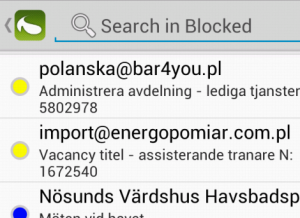
New blocked with search function

New blocked with search function

New allowed email list with search function

New allowed email list with search function

New iOS app on the way

Today we have submitted a new version of our SpamDrain iOS app for review. In this update you will now be able to empty the Archive and Report sections which is handy if you want to keep your Archive clean. Using the Empty function enables you to keep track on new messages that have been filtered since you last emptied your Archive.

We have also fixed a very annoying bug that occurred for some users when signing up. They got stuck in the last step after having the error message “This field is required” presented. We finally managed to identify the root cause for this one.

Another change with this update is concerning Apple’s In App Purchase. For reasons unknown to us, Apple no longer allow services like SpamDrain to use their auto-renewable subscriptions. Instead we need to switch to non-renewing subscriptions. This means that you need to renew manually before the subscription ends. It’s not that big a deal since most of our users pay using our web page where it already works like this. But for our monthly subscribers that are used to getting their subscription renewed every month, there will be a change. We ask for your understanding – this is totally out of our control and is due to regulations from Apple.

If you like you can always renew your subscription by logging on to our web page: https://app.spamdrain.net and click the $ icon in the upper right corner.

If you pay your subscription through our web page, you do not need to worry about this change. It only concerns customers who use In App Purchase from within our app.

A while ago we modified our regular SpamDrain subscription slightly. You may now filter up to five addresses in a SpamDrain account (for only €9.99 or $14.99 / year and address) compared to single address filtering as before. This simplifies for all of you beloved customers who want to filter a couple of extra addresses since you do not need to manage separate logins to different SpamDrain accounts but may instead handle all filtering with one login to our site and iPhone and Android apps.

As before you may also choose SpamDrain+. With SpamDrain+ you may add multiple users, filter domains and utilize our personal support. For more info please visit http://spamdrain.net/en/spamdrain-plus

By the way…talking about our apps – we will shortly update our iPhone app so you can view filtering status for all your addresses and update your filtering settings. Stay tuned.

Today we have some good news for all our customers who filter their domain through SpamDrain. You will now be able to manage aliases to filtered addresses directly on the web. There is no extra cost for adding aliases but they must be mapped to one or several filtered addresses. You can also have aliases from one domain pointing to addresses in another one .

We have also improved domain handling so it should be easier to add and manage your domain filtering. You can now also search for both filtered addresses and aliases in the domains page. This feature is also available in the users page.

Please note that all changes made to the domain filtering will take up to five minutes before they propagate to all servers.

Today we have made it easier for you to share SpamDrain and for you to get something out of it. Well, you probably already know that if everyone was using a great spam filter, sending spam wouldn’t pay off and the internet would be a much better and happier place. Help us making the world spam free by inviting your friends and colleagues to join SpamDrain and we will reward you with free months.

We have added a new Sharing page Share SpamDrain where you can send invites or share SpamDrain in your social networks, blogs, web pages etc. Simply Log in to your SpamDrain account and hit the Share icon in the upper right corner.

For every paying new filtered address you generate, we will add extra months to your subscription – depending on how many addresses you currently filter. For example, if you filter one address today, you will receive three free months for every new paying filtered address you generate. If you filter two addresses you will receive 1.5 free months for every new filtered address.

The more addresses your friends filter the more free months you receive. Isn’t that great?

If you are generating great volumes you will have the opportunity to join our reseller program instead and start earning real money.

So, start sharing today and make the world a bit more spam free.

Other new features in this update

  • Messages that you have retrieved from the archive can now be displayed and re-delivered.
  • Clearer indication when a message is blocked due to blacklisted sender.
  • Remove entries from blacklist.
  • You may now extend your subscription even when there is more than a year left.

For some time we have working on a new type of filter which blocks newsletters and marketing emails. We have being testing it for a while we are really happy with the progress. So today we tell you a little bit more about how it works. Really soon we will enable new functionality in our iPhone, Android and web apps, enabling you to control this filter. (We actually updated our web site today already)

First, some background. As you know you can report spam that SpamDrain has failed to block. This is done in our mobile apps or by logging on to our web site. We have noticed that different users have different definitions of spam. The most obvious definition might be “spam is everything I don’t want in my inbox” (even messages you have accepted to receive but don’t take the time to unsubscribe to). However, there is a problem with this definition. Some people want coupon offers from their local store and some do not want them. With viagra mail it’s much simpler – nobody wants that crap.

We have therefore chosen to introduce this new filter which identifies newsletters and marketing emails and put them in your Archive marked as “Newsletters”. These emails are always listed in your daily/weekly/monthly SpamDrain report so you never have to worry about missing important offers. Of course, you will be able to retrieve/release these blocked message as usual. When retrieving blocked messages from the Archive, SpamDrain will learn not to block similar messages again. You can also turn this filter entirely off.

To train our filters to become even more efficient, we appreciate if you our users could give us a little help when retrieving a message: You will now be asked to classify the message. By helping us deciding why you are retrieving a specific message you will help improving the overall filtering accuracy. The choice you will be given is:

You will get the same question when retrieving a message in the mobile apps.

We hope you will like these improvements – and hey, if you don’t – you can always turn the newsletter filter off. We hope you will enjoy receiving even less spam in the future. Please let us know what you think about these updates.

Please let us know what you think about these updates.

More for more information about the newsletter filter and retrieval of messages from the Archive.

Price adjustments for SpamDrain+

Yesterday we made some updates which hopefully will continue to improve the experience of SpamDrain. We added the possibility to report or retrieve directly in the message lists (Archive and Report), so you do not need to click the message in order to report it. The Report button appears once you hover over the row. Note that you will not need to confirm the reporting so before you click, be sure you really wish to report it as spam.


We also added the hover feature in other lists, so actions appears once you move your mouse over the row. In the filtered address lists, for example, you will now see the Delete icon and the new Pause icon when moving the mouse over the row. Pause filtering is a new feature we have added to give you more control over your SpamDrain account.

Clicking the Pause button will pause the filtering for this address. Once paused, SpamDrain will stop accessing your e-mail account. If you are using domain filtering, SpamDrain will simply let everything through for the paused address.

Once paused, a Play icon is displayed instead which once clicked will start the filtering again.

This pause feature is useful if you have problem with your e-mail access and want to see if SpamDrain is locking your mailbox or if you simply wish to go back to the good old times when tons of spam reached your inbox ;-)

We have also made some minor improvements in the login and sign up user interface.

The next few weeks we will continue working with minor improvements and adding help documentation where needed.

Feel free to comment the changes we made recently. Your opinion is the most valuable we have!

New website and webapp released

The last couple of months we have been working on improving the webapp. The goal has been to make it easier to get started with SpamDrain and making it even more easier to use than before.

Today we finally made the first step launching the a new SpamDrain. We will be making quite a few more improvements the coming months. Please feel free to give us feedback!

With the release today, we also introduce two levels of SpamDrain: SpamDrain and SpamDrain+. Please read more on our website:

spamdrain.net

We are updating the SpamDrain web

We are proud to announce that SpamDrain for Android 1.1 now is available in Market. Go to Market and search for spamdrain in your phone or simply wait for the automatic notification in Android.
With this new version you will now be able to access your filtered messages.

New features in 1.1:

  • View archive which contains blocked messages.
  • Deliver blocked messages to inbox.
  • View filtered but not blocked messages.
  • Report missed spam.
  • Better support for different screen sizes.

What are you waiting for – go to Market and upgrade!

Feel free to rate us and write an excellent review.
If you find a bug, tell us instead and we will fix it :-) .

Some screen shots:

SpamDrain-ScreenShot-RegistrationSpamDrain-ScreenShot-Home SpamDrain-ScreenShot-Archive SpamDrain-ScreenShot-EmailView

SpamDrain QR code

Last weekend we moved the domains www.spamdrain.net, pop.spamdrain.net and imap.spamdrain.net to our new servers. This means that we’re now almost completely running on the new infrastructure we first wrote about back in March. It’s taken a bit longer than we expected back then but now we’re almost there.

The only thing remaining now is to move the services providing filtering for our domain filtering customers. We will do this during the coming months and we hope this will be completed by the end of the summer. Most of you who use the domain filtering service won’t have to do anything and won’t notice. No need to change your MX records.

If you have set up your firewall as recommended in our FAQ you will only have to make sure to update the rules so that it doesn’t block the IP addresses used by our new servers. Please make sure your firewall has been configured to accept all traffic on port 25 (or the port used by your mail server) from the following IP addresses:

85.24.138.228
85.24.138.229
85.24.138.129
62.75.203.192 - 62.75.203.223 (62.75.203.192/27)

You can read more about how to configure your firewall in our FAQ (log in required).

We have added the possibility for SpamDrain users to turn off the DNS blacklist filter which currently blocks messages sent from known spam servers. Why would you want to do that, you might wonder? (…or you just wonder What is DNS blacklisting ;-) ). Continue reading “DNS blacklisting can now be turned off” »

SpamDrain lanserar nu webbmejlfiltrering av POP3- och IMAP-konton. Det innebär att användaren får spam- och virusfiltrering även i sin vanliga webbmejl. Man behöver inte byta webbmejl utan fortsätter att använda sin leverantörs webbmejl precis som vanligt.

Sedan tidigare har SpamDrain-användare som filtrerar hela sin domän redan fått filtrering av webbmejl eftersom SpamDrain då stoppar spam och virus innan de levereras till användarens e-postserver. Om man däremot använder POP3 eller IMAP så sker filtreringen i det ögonblick användaren kopplar upp till SpamDrain via sin dator eller mobil. När man läser sin e-post i webbmejlen har man således inte fått någon filtrering.

Den nya webbmejlfiltreringen innebär att SpamDrain kommer fortsätta filtrera användarens mejl med jämna mellanrum även då användaren inte kopplar upp sig till SpamDrain. SpamDrain ställer själv automatiskt in intervallet beroende på om användaren själv ligger och hämtar sin e-post.

Typiskt är att man kontinuerligt kontrollerar sin e-post på kontorstid. Då finns det ingen anledning för SpamDrain att i bakgrunden filtrera mejlen. Det SpamDrain istället gör är att känna av att användaren inte hämtat sin mejl på ett tag och påbörjar då bakgrundsfiltreringen.

Användaren behöver fortfarande inte uppge något lösenord till sitt e-postkonto på SpamDrains sajt. Istället sparas lösenordet automatiskt första gången användaren hämtar sin e-post via sitt e-postprogram. Lösenordet krypteras och lagras säkert hos SpamDrain. Om användaren byter lösenord på sitt konto kommer SpamDrain automatiskt att uppdatera det lagrade lösenordet nästa gång inloggning sker med e-postprogrammet.

Användaren väljer själv om man vill aktivera webbmejlfiltrering eller inte. När man skapar ett nytt konto kommer det vara ifyllt som standard, men befintliga användare måste själva gå in och aktivera funktionen.

Användaren kan fortfarande använda sitt vanliga e-postprogram tillsammans med webbmejlfiltreringen. SpamDrain kommer då se till att “vanliga” inloggningar till servern inte blockeras och automatiskt öka intervallet om SpamDrain märker att användaren redan ligger och kontrollerar sina mejl kontinuerligt.

När exempelvis användaren lämnar kontoret eller stänger av sitt e-postprogram kommer SpamDrain märka att man inte loggat in på ett tag och därefter automatiskt börja filtrera e-posten i bakgrunden.

Webbmejlfiltreringen är ett naturligt steg för att våra användare ska få lugn och ro i alla inkorgar de använder.

Enligt en undersökning från Halon Security kostar sex-spam företaget 120 kr per månad och anställd i förlorad arbetstid. Lägg därtill alla andra spam och eventuella virus och trojaner som kan komma in till följd av för mycket skräppost. Även om man ska ta sådana här studier med en stor nypa salt (!) så kan man inte låta bli att räkna fram vad en typisk SpamDrain-kund sparar genom att använda SpamDrain:

Ett företag med 10 e-postkonto som filtreras av SpamDrain kostar 1 870 kr/år. Enligt Halon Security skulle det kostat företaget 120 kr x 12 mån x 10 anställda = 14 400 kr/år. Med SpamDrain sparar alltså ett företag med 10 avändare 12 530 kr/år. Ett resultat att ta med en gnutta salt ;-) . Förmodligen sparar man betydligt mer än så pga produktivare personal, mindre driftsproblem etc.

Alla priser exklusive moms.

Läs mer på IDG.

For the past week a massive attack has infected PCs by tricking users into clicking links in fake messages from CNN.com. The attack has shown little sign of ending soon. The links in the spam mails go to sites which tell you to download the Adobe Flash player to watch a movie. What actually happens when you run this file is that a trojan is installed on your computer. The trojan adds your computer to a worldwide Botnet.

The email itself looks like a completely normal message from CNN.com and some of the links in the email also go to CNN. Right now there is a similar attack in progress, although this time MSNBC.com (NBC’s and MSN’s news site) is used to mask the attack. Spam has flowed in since around 11am on Tuesday. The sites, which the spam messages link to, are most likely hijacked ones and the site owners are probably not yet aware that their sites contain malicious code.

Firefox and Internet Explorer 7 now include filters to block sites like these. However, it normally takes several days before a hijacked site has been reported to these filters. Until then, no warning will be displayed when surfing to these sites.

You can now log in to your personal pages and view statistics for your subscription. Currently there are charts displaying the amount of filtered spam, viruses and regular messages as well as the percentage of all spam SpamDrain has been able to catch for your accounts. The charts display statistics for the last week, the four last weeks and the last 6 months. Continue reading “SpamDrain displays spam statistics for your subscription” »

Nu kan du se statistik över mail som filtrerats för ditt abonnemang. I dagsläget visas diagram över hur mycket skräppost, virus och riktiga meddelanden som filtrerats samt hur stor andel av alla spam som SpamDrain fångat för ditt abonnemang. Diagrammen visar statistik för den senaste veckan, de fyra senaste veckorna samt för de 6 senaste månaderna. Continue reading “Ny spam-statistik för ditt abonnemang” »

Har du märkt att du nu kan söka bland e-postkonton och användare? Detta gör det enklare att hitta för er medlemmar som har många konton upplagda. Sökningen har vi valt att göra så enkel som möjligt varför du endast har ett textfält att skriva in din sökning i. Själva sökningen sker sedan automatiskt bland användare, e-postadress, användarnamn, servernamn etc. Berätta gärna vad du tycker om detta! Vi har även ändrat e-postkontolistan för att få den mer överskådlig.

Samtidigt med denna förbättring har vi även passat på att rätta till diverse småfel. Vi hanterar numera bounces av meddelande för vår domäntjänster på ett bättre sätt. Nu studsar meddelanden med ogiltig mottagare direkt vid leverans istället för att köas upp på våra servrar.

Vi vill gärna att ni medlemmar fortsätter att komma med synpunkter på förbättringar. På så sätt kan vi fortsätta att leverera en superbra tjänst med klockren filtrering ;-) .

The problem with VAT number validation for French VAT numbers are now fixed. All valid French VAT numbers should now be validated correctly.

IDG rapporterar att en plötslig anstormning av asiatisk skräppost fått Sprays mailtjänst att gå på knäna. Även här på SpamDrain har vi de senaste dagarna märkt av en ökning av mängden spam som skickas till våra kunder. Anstormningen har dock inte lett till några problem för tjänsten eller våra kunder. Idag verkar andelen skräppost ha återgått till mer normala nivåer.

Se statistik på SpamDrain Security Center.

Archives